Showing posts with label Windows Application. Show all posts

Wednesday, September 4, 2013

How to validate DataGridView column to allow only numbers in c#

I'll use a windows application form to demonstrate this. Let say you have a datagridview which has to prevent entering Non -numerical values in the particular columns. I'm using Cost and SellingPrice Columns to demonstrate the validation. (Do Not worry about attached image dataset. Just follow the code snippet on validation )

You have to use CellValidating event to tackle this.


Follow the below code snippet for the validation;
private void dataGridViewDistribution_CellValidating(object sender, 
DataGridViewCellValidatingEventArgs e)
{
    DataGridViewColumn col = dataGridViewDistribution.Columns[e.ColumnIndex] as DataGridViewColumn;

    if (col.Name.ToLower() == "cost" || col.Name.ToLower() == "sellingprice")
    {
        DataGridViewTextBoxCell cell = dataGridViewDistribution[e.ColumnIndex, e.RowIndex] as DataGridViewTextBoxCell;
        if (cell != null)
        {
            char[] chars = e.FormattedValue.ToString().ToCharArray();
            foreach (char c in chars)
            {
                if (char.IsDigit(c) == false)
                {
                    MessageBox.Show("You have to enter digits only");
                    e.Cancel = true;
                    break;
                }
            }
        }
    }
}

Tuesday, July 23, 2013

Create Yes/No/Cancel buttons in MessageBox Windows Application

This code snippets will elaborate handling MessageBox Yes/No/Cancel button in Windows Application using C#. Follow below steps to create a small application to do this by yourself else download the attachment for the sample application with visual studio 2010.

1.) Create a Windows Application and give it a preferred name.
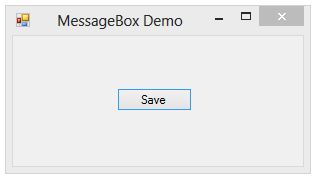
2.) Add a form to the solution and add a Button as displayed below image.

3.) Now double click the button and add following code snippet as displayed below.
private void btnSave_Click(object sender, EventArgs e)
{
  // get the result 
  DialogResult result = MessageBox.Show("Hi, do you want to test messagebox buttons?",
  "MessageBox Buttons Demo", MessageBoxButtons.YesNoCancel, MessageBoxIcon.Information);
 if (result == DialogResult.Yes)
 {
    // if user clicked 'Yes' button
 }
 else if (result == DialogResult.No)
 {
   // if user clicked 'No' button
 }
 else
 {
   // if user clicked 'Cancel' button
 }
}

4.) Now press the "Save" button which shows below messagebox. You can changed the MesageBoxIcon either MessageBoxIcon.Exclamation,MessageBoxIcon.Asterisk.


5.) Based on the result Yes/No or Cancel modify your code to manage your application.

Download