Showing posts with label SQL Server. Show all posts

Wednesday, May 17, 2017

Word breaking timed out for the full-text query string

Recently I encountered this error while working on Microsoft Sql Server 2008. The error description as below:

"Word breaking timed out for the full-text query string. This can happen if the wordbreaker took a long time to process the full-text query string, or if a large number of queries are running on the server. Try running the query again under a lighter load."

I found common workarounds for the issue.

Solution 01

You can increase the ISM size by using the sp_fulltext_service stored procedure as follows. Please note that you need to restart the SQL Server service for this change to take effect.


--To show the current value:
sp_fulltext_service 'ism_size' 

---To change the value to 16:
exec sp_fulltext_service 'ism_size',@value=16

Solution 02

Set the VerifySignature to 0

SELECT FULLTEXTSERVICEPROPERTY('VerifySignature');
GO
-- if 1, then turn off verify_signature
EXEC sp_fulltext_service 'verify_signature', 0;
GO

If you want to read more on this issue refer:

  • https://social.msdn.microsoft.com/Forums/sqlserver/en-US/1e7d15d3-818f-4db3-b760-b897b91973ae/sql-2008-word-breaking-timed-out-for-the-fulltext-query-string?forum=sqlsearch
  • https://social.msdn.microsoft.com/Forums/sqlserver/en-US/699221f0-a850-4f1d-b1db-a067a172f866/sql-server-timeout-is-by-design-when-using-fulltext?forum=sqlsecurity
  • https://social.technet.microsoft.com/Forums/en-US/a0718411-d0ec-49a8-bfff-d5cb9e04208b/full-text-timed-out-exception?forum=transactsql

Wednesday, July 9, 2014

How to Fix Errors 0x800f081f on Windows 8.1 Update

I have encountered error 0x800f081f when installing Windows 8.1 in my machine. Once I googled, it seems many users fail to install this update because of error 0x800f081f, 80070020 and 80073712. The most common question was “Windows 8.1 update failing to install with errors 80070020, 80073712 and 0x800f081f”. Most of the proposed solution was to update windows by turn on windows features or manually install the KB2919355 update. You can find the solution which might work for some users. But this did not work for me. Article was “Solved: Windows 8.1 Update 1 Errors 80070020, 80073712 & 0x800f081f”.


Most of the accepted solution was to install that update manually and enable .Net framework 3.5. But this didn’t help me out to fix the issue. It was keep telling same error 0x800f081f. Here what I found and worked for me to save my lifeJ. Hope this solution will help for someone someday.

Step 01:
Open command prompt as an Administrator. Right click on the left bottom corner menu and click "Command Prompt (Admin)".

Step 02:
Update windows using offline mode. For that, Use the windows 8.1 installation DVD or Local copy of the ISO file. Extract the files into your drive. eg: D:/OS/Windows/

Step 03:
Locate the folder "\sources\sxs" within your extracted files. eg: "D:\OS\Windows\sources\sxs". Use this file path in next step.

Step 04:
dism.exe /online /enable-feature /featurename:NetFx3 /All /Source:"D:\OS\Windows\sources\sxs" /LimitAccess
Paste this command to the command prompt and press enter and wait until it gives a message as shown in bellow image:

Step 05:
Go to the windows features and check whether the .Net Framework 3.5 is enabled. If so you are done.!J

.NET Framework 3.5 you can see that the feature is enabled

Note: Your can use this steps to install .net framework 2.0 and 3.5 on windows by using offline mode. If you prefer to go with online windows updates please continue. This article is for the user who might face difficulties during the windows 8.1 update error 0x800f081f, 80070020 and 80073712, installing .NET Framework 3.5 features, installing sql server databases, windows server 2012.

Tuesday, September 17, 2013

Convert VARCHAR value to decimal value with thousand separator in SQL Server

This is really easy to do in following way. Have a look on below snippets:
DECLARE @NumberValue varchar(100)
SET @NumberValue = '1234567891234.45'

SELECT CONVERT(VARCHAR,CONVERT(MONEY,@NumberValue),1)

Result:  1,234,567,891,234.45

If you need to add any decimal places, just use following snippet to handle it.
DECLARE @NumberValue varchar(100)
SET @NumberValue = '1234567891234'

SELECT CONVERT(VARCHAR,CONVERT(MONEY,@NumberValue),1)

Result:  1,234,567,891,234.00

Saturday, September 14, 2013

Create an IDENTITY Column in temp tables in SQL Server

First there are different types of temporary tables that you can create in Sql Server. Such as #tempTable, ##tempTable, @tempTable. Those temporary tables can be used based on your requirement. In this example I will use #tempTable to demonstrate this topic.

Follow the below code snippet to get the job done..!

-- Create #tempTable 
CREATE TABLE #tempTable
  (
     ID        INT IDENTITY(1, 1),
     FirstName VARCHAR(10),
     LastName  VARCHAR(10),
     IsActive  BIT
  );

-- Insert values into #tempTable,
-- Do Not insert values into ID column
INSERT INTO #tempTable
            (FirstName,LastName,IsActive)
VALUES     ('Aruna','Perera',1),
           ('Damith','Ferenando',1),
           ('Kasun','Kalharaa',0)

-- Pull the data that have inserted
SELECT *
FROM   #tempTable

-- Drop temp Table
DROP TABLE #tempTable 

Make sure that your have drop the temporary table after you selecting records from that table.


Wednesday, July 24, 2013

Create Row items as a string with Comma Separated Values in SQL Server

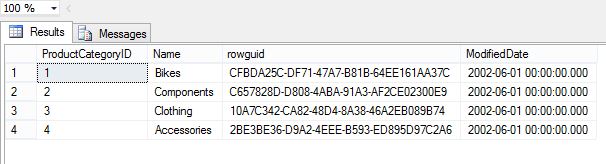
In this example, i will describe how to create a comma separate string using database row items. To do that, I will use AdventureWorks2008R2 SQL Server database [Production].[ProductCategory] table. I will create a comma separate string using name column in following example:

1.) Run the following query and see whether you have records in the table
SELECT *
FROM [AdventureWorks2008R2].[Production].[ProductCategory]
This will return following result as displayed below:

2.) Now run the following query to get the result. For that I have used COALESCE function. For more information about COALESCE function please refer this link.
USE AdventureWorks2008R2

--@CategoryList is variable to add the category names
DECLARE @CategoryList VARCHAR(MAX)

SELECT @CategoryList = COALESCE(@CategoryList + ', ', '') + [Production].[ProductCategory].Name
FROM [Production].[ProductCategory]

-- Returns the result
SELECT @CategoryList 
Now you can see the following result.


Download